Email Marketer is a personalized send email publishing and tracking software. It is the software for Bulk Email Software, Email Marketing Software, Email Tracking Software, Newsletter Software, Permission Marketing, Mass Email Software, Email Campaign Software, Direct Email Marketing, And More.
Search: Choose your language:  
Email Marketer is a professional personalized newsletter software and email marketing software, publishing and tracking service provider software for Windows.
Nesox Email Marketer
  Overview
  Features
  Editions
  Awards
  What's New
Demo and Samples
  Screenshots
  Template Samples
  Report Samples
Support
  Online Help
  FAQ
  Contact Us
How to get it
  Download Trial
  Purchase

Add your review
February, 2006
Stephen Bowden:
Very impressed with trial version compared to other packages I have considered - Email Marketer was by far the easiest to navigate and provided a functionally rich user environment.

April, 2005
Koichiro Sugimori:
Very clear and simple yet professional. I like it.
I think your customer support is fantastic! They have replied all my questions and are very helpful as well!

October, 2004
Nick J Jeffery:
Thanks for a good newsletter program. I have used it now for a six months with no problems. I think this is a great tool which helps a lot with all my customers.


How to create and use my own domain for email tracking?


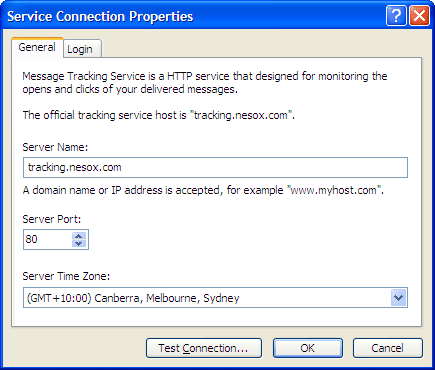
You know, the server name of tracking service provided by us is "tracking.nesox.com" and it will displayed in the URLs of each tracking message (For example: Hovering on this link). This is not friendly to your customers, and this problem could be solved by the customized domain service now!

Guides for customized tracking domain creation

  1. Supposed your website domain is "www.mydomain.com";
  2. Contact your ISP or your webmaster to add a CNAME record pointing to tracking.nesox.com; (For example: tracking.mydomain.com->tracking.nesox.com)
  3. Order the customized domain name service;
  4. Contact our technical support (support@nesox.com) and advise both your CNAME and order ID;
  5. In Email Marketer tracking account dialog, change the server name from "tracking.nesox.com" to your CNAME. Done!

Order customized domain service now!


If you have any difficulty for the setup, please feel free to contact us.

Privacy Policy About Us Contact Us Reseller Site Map
2002-2008 © Copyright Nesox Solutions. All Rights Reserved. Last updated at March 10, 2008. Add to Favorites