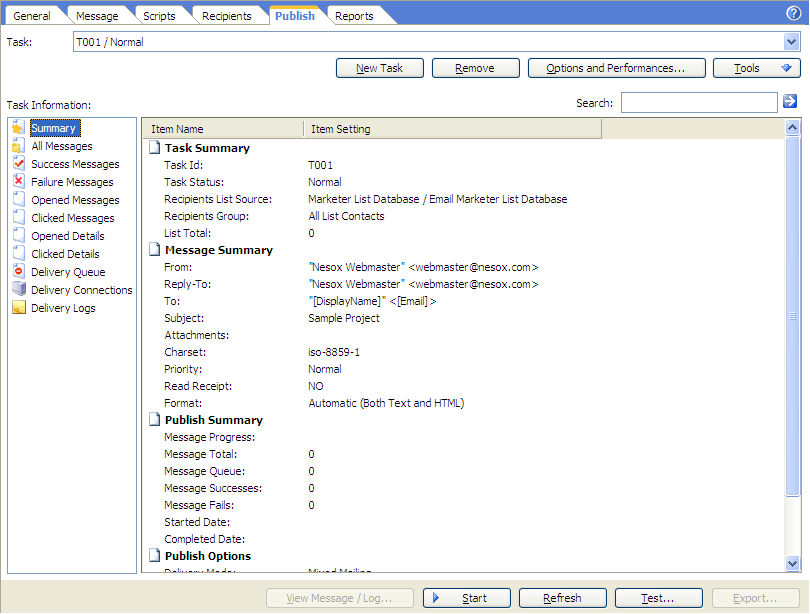
Email Marketer can quickly and easily deliver a great number of personalized email messages directly to the recipients list, without using your ISP Internet SMTP relay server, because Email Marketer is a self-sufficient SMTP relay. (You may use your own SMTP server if you want to as well, if you want to). Thanks to this feature, Email Marketer gives you INSTANT feedback on every message sent. In other words, you can instantly verify which emails addresses are not functioning and discard the invalid recipients of your list.
If you are an Email Marketer Business Edition user, Email Marketer can also help you scheduling send the messages.
To send the messages, please click Publish at the header of the project window and click the Start button.
New Task
Creates a new delivery task using the existing publish options.
Remove
Removes the selected task. Note all messages logs in the task will be also removed.
Options and Performances
Customizes the mailing account performances, the delivery mode, thread count and more performance related settings.
Schedule
Schedules the publish task of the project.
View Message / Log
Views or resends the selected message.
Start / Resume / Stop
Starts or stops the campaign task, of sending the personalized messages to receipts.
Note: When a delivery task is completed, the Start button will be disabled. To send the messages and enable the Start button again, please click New Task button.
Note: You may click the X button of the main window to minimize the application to the system tray area during the sending progress.
Refresh
Reload the messages.
Test
Tests the delivery to a specified email address.
Export
Exports the email addresses or delivery details in the view.
For more information about message delivery, please reference: