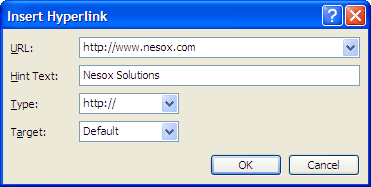
To insert a hyperlink to the HTML message, click the Insert menu and select Hyperlink.
To create a hyperlink from existing message text, simply select the text before you create the hyperlink.
To edit an existing hyperlink, click within a hyperlink and choose Hyperlink from the Insert menu.
URL
The hyperlink of the URL. For example, "http://www.nesox.com".
Hint Text
The text for hint when the cursor is hovering on the hyperlink.
Type
Hyperlink type. For example, select the "mailto:" type after entering "support@nesox.com" for the URL. This creates a link that will automatically open up you recipients default mail client with
an email addressed to wherever you choose.
Target
Target window to browse the hyperlink when your recipients clicks on it.